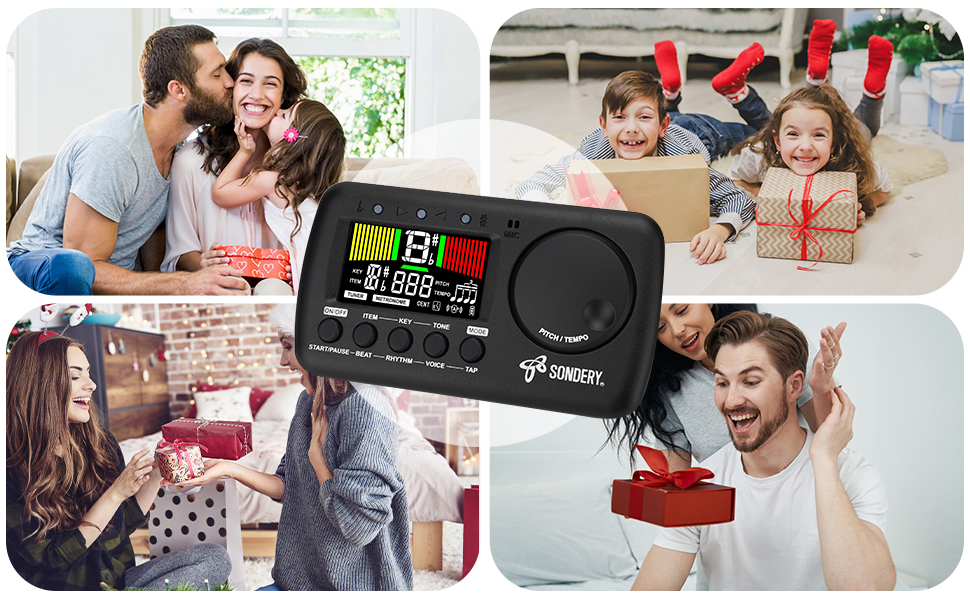
- 3 in 1 metrotuner. The MetroTune combines a tuner, a metronome and a tone generator in a pocket size device. Equipped with beautiful colors screen, 3 indicators, loud speaker, Mic and cable jack detections, earphone output, volume wheel and folding kickstand to make operation super easy.
- English vocal metronome with tap tempo. A broad range of tempo 30-260bpm, setting self tempo by tap, beats from 0 to 9, and various 8 rhythms. English vocal counting greatly helps follow the timing under a correct beat.
- Versatile tuner. The fast and accurate tuner features various tuning items for chromatic, guitar, bass, ukulele, acoustic guitar, electric guitar, violin, mandolin, piano, saxophone, trumpet, and other wind instruments, and also 12 different tuning keys, with pitch calibration from 410Hz to 450Hz, by tuning method using internal mic or enclosed pickup cord.
- Jog dial designed to easily use. The JOG Dial allows you to easily and quickly get a desired tempo for metronome, and to swift to a pitch in the Tone Generator and the Tuner.
- Power rechargeable. Plug to 5V USB power source with enclosed type C USB cord to charge the device. With a 600mAH Li battery inside, only 1 hour charge for durability of non-stop work of 5 hours. Save a lot of batteries!ONLY use USB A to USB C charge cable as enclosed or similar to charge your device!!! ( NO USB C to USB C cable. )
- Equipped with a large LCD color screen and LED indicator, making it very user-friendly, especially in dark environments. MetroTune comes with instructions in seven languages, making it easy for musicians around the world to use.
Product information
Item Weight: 4.3 ounces
Product Dimensions: 3.35 x 1.14 x 4.96 inches
Item model number: MetroTune
Batteries: 1 Lithium Polymer batteries required. (included)
Body Material: Plastic
Color Name: MetroTune
Connector Type: USB-C
Battery type: Lithium Polymer

Sondery MetroTune - Metronome Function
Using Metronome
Start/Pause Metronome
Press button ‘START/PAUSE’ to start metronome, another press the button to pause metronome. When the metronome started, center green meters will
flash accordingly. The 3 LED indicators will also flash. 1 green indicator and 2 red indicators light up for accent beat, and only 1 green indicator lights up
other weak beats.
Tempo
Turn the wheel ‘TEMPO’ clockwise or counter-clockwise to choose different tempo. The tempo ranges from 30 beats per minute to 260 beats per minute.
Beat
Press button ‘BEAT’ to choose a beat. The beat options includes 0, 1, 2, 3, 4, 5, 6, 7, 8, 9.
Rhythm
Press button ‘RHYTHM’ to choose different time value ( rhythm ). There are 8 different time values.
Voice
The metronome also has a woman voice counting function. Press button ‘VOICE’ to turn on voice counting.
Tap
When you have your own tempo to input, just continuously press button ‘TAP’ to record your tempo. Each 2 presses sets the tempo.
Sondery MetroTune - Tune Function
How to Tune
Tuning Signal Input Ways
· Using internal MIC. If you want to use the internal MIC, do not plug any cable into the INPUT jack. Place your instrument as close as possible to your device, so there is no other sound is detected when you play your instrument and tune.
· Using external cable. You can use enclosed piezo pickup cable, insert into the INPUT jack and clip onto your instrument. Or, you can use your own instrument cable, like guitar cable etc., to link your instrument to the INPUT jack of the device. When using your own instrument cable, please note that only 6.35mm or 1/4inch gauge, mono cable is allowed.
Tuner Function
Tuning Process Panel Shows
When the tuner detects a signal, the screen shows a note name of the detected signal, and a positive or negative digit of CENT away from IN
TUNE when under C ( chromatic ) or under KEY tuning, or a digit of string number when under G ( guitar ), B ( bass guitar ), or U ( ukulele ) tuning.
The different color tuning meters will show up. The LED indicators will also light up accordingly.
· Left yellow meters show, left red LED indicator lights up, ( negative digit of cent ): FLAT.
· Center green meters show, center green LED indicator lights up, ( digit of cent ranging from -3 to 3 ): IN TUNE.
· Right green meters show, right red LED indicator lights up, ( positive digit of cent ): SHARP.
Charging
How to Charge
To charge, please use the enclosed Type-C USB charging cable to connect with 5V USB sources including USB adapter, power bank or computer.
ONLY use USB A to USB C charge cable as enclosed or similar to charge your device!!! ( NO USB C to USB C cable. )